Available 7 days a week · 9 AM–5 PM Eastern Time7 days · 9 AM–5 PM ET[email protected]
Personalized mail · private offer pages · real-time response
Turn direct mail into trackable seller conversations.
Create personalized postcards and letters for individual properties, upload your company logo and headshot once, and control what appears on every send. Track available production and USPS/provider delivery status in Mail HQ. Each homeowner receives a private cash-offer page personalized with your brand, their name and their property. When the homeowner submits the request, SCOUTRE sends a “Cash offer requested” push to your phone and records it on the lead.
The property photo earns attention. The private offer page turns attention into visible intent.
Logo + headshot controlsPrivate branded offer pageDelivery status trackingReal-time offer-request alertsMail HQ160M-property data foundation
Real app · saved property lead
Step 1 · Start from lead
Mail lead already in your hands.
Captured photo, owner, property data, signals, contact actions, and Mail button already live together. Tap Mail. No export. No second system.
Captured photo stays attachedOwner and property already selectedMail history returns to same lead
Real app · current formats and prices
Step 2 · Choose format
One postcard, six touches, or mailed letter.
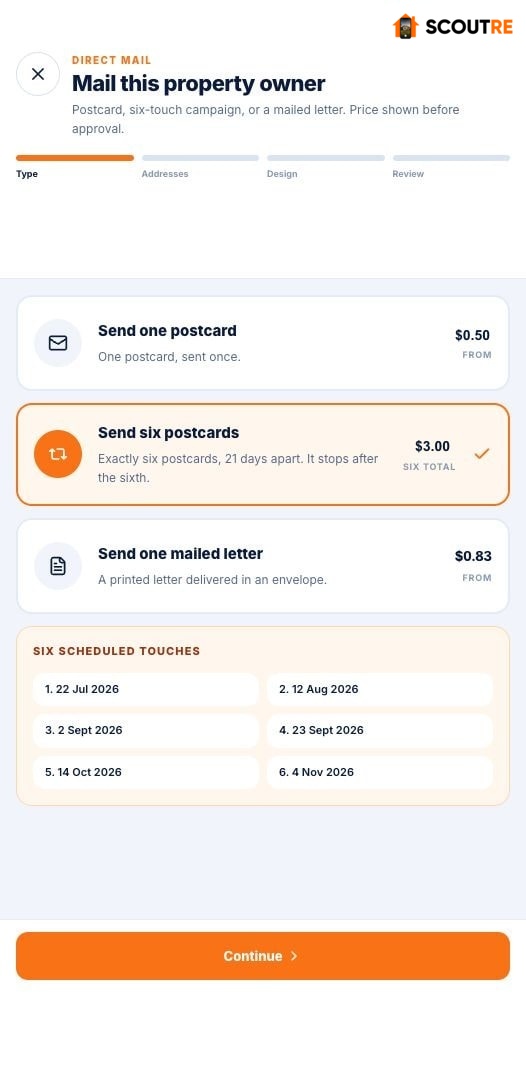
Choose one 4×6 postcard for $0.50, six-postcard campaign for $3.00, or mailed letter for $0.83. Current app shows price before creative work starts.
Postcard printing + postage includedSix-touch campaignMailed letter option
Step 3 · Verify recipient
Mail owner where owner receives mail.
Property address and owner mailing address stay on lead. Choose correct destination, then verify mail-to and return addresses. Vital for absentee owners, out-of-state heirs, and probate representatives.
Property + mailing address savedRecipient verified before sendReturn address verified too
Step 4 · Choose template
Six postcard layouts inside real app.
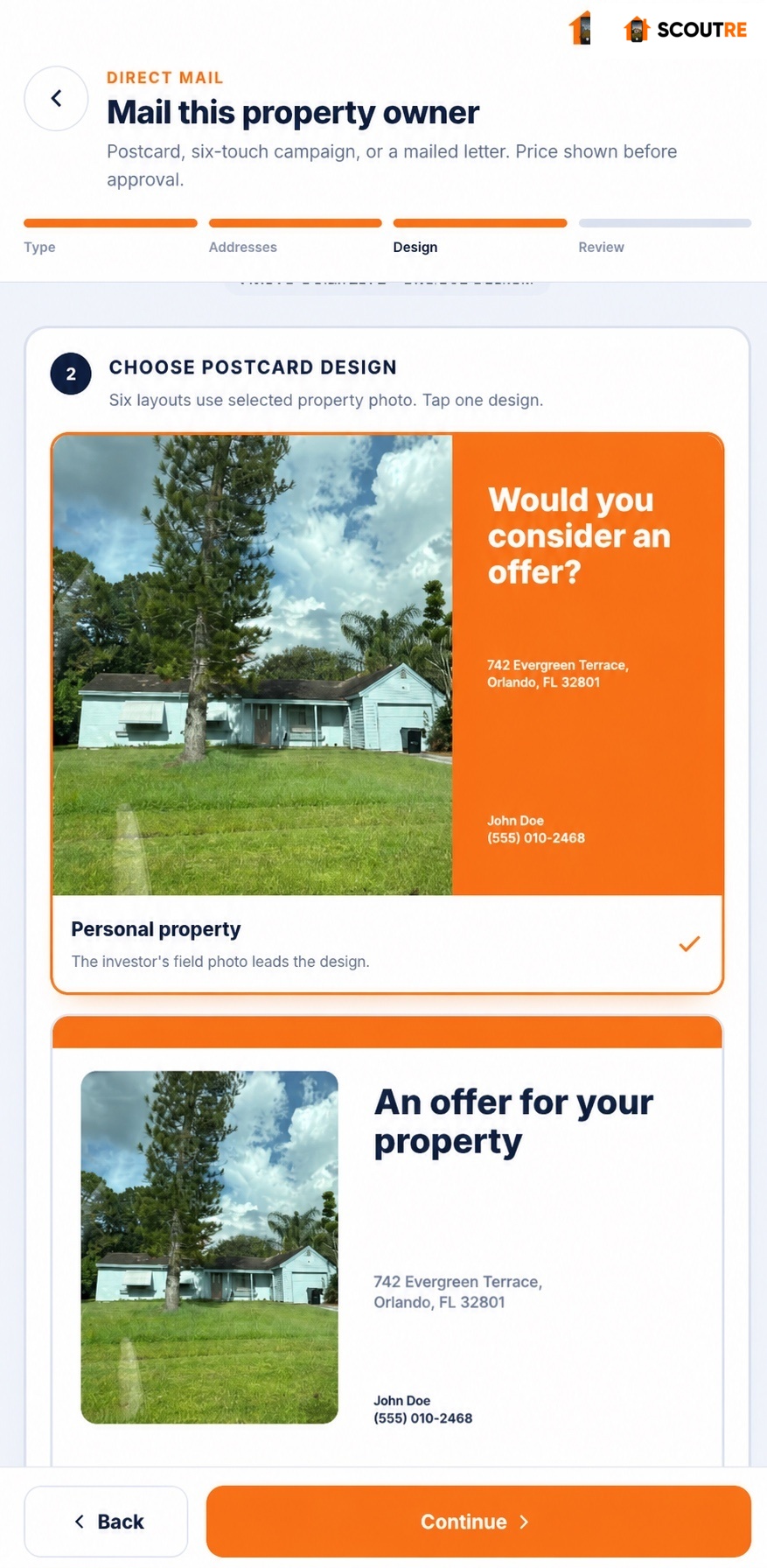
Choose Personal property, Simple offer, Neighborhood buyer, Bold cash offer, Full property photo, or Classic local buyer. Use different creative for each campaign touch.
Six live postcard layoutsProperty photo flows into designDifferent template per campaign touch
Step 5 · Personalize
Make every piece look sent by you.
Use captured property photo, saved logo, headshot, message, handwriting style, ink color, size, and realism. SCOUTRE fills homeowner and property fields from lead.
Saved logo + headshot16 handwriting stylesDynamic homeowner + property fields
Step 6 · Review proof
See exact front and back before payment.
Review final property photo, brand, message, recipient, and unique QR. Current proof shows exact $0.50 price before Pay & send.
Exact front-and-back proofUnique QR visiblePrice shown before payment
Real app · final approval screen
Step 7 · Pay + send
Approve real proof, then send.
Pay & send appears after final proof. One 4×6 postcard costs $0.50 including printing and postage. No mail order was submitted while taking screenshot.
Proof comes before paymentPrinting + postage includedCampaign keeps selected creative per touch
Personalized mobile cash-offer page
Step 8 · Seller page
QR opens personalized cash-offer page.
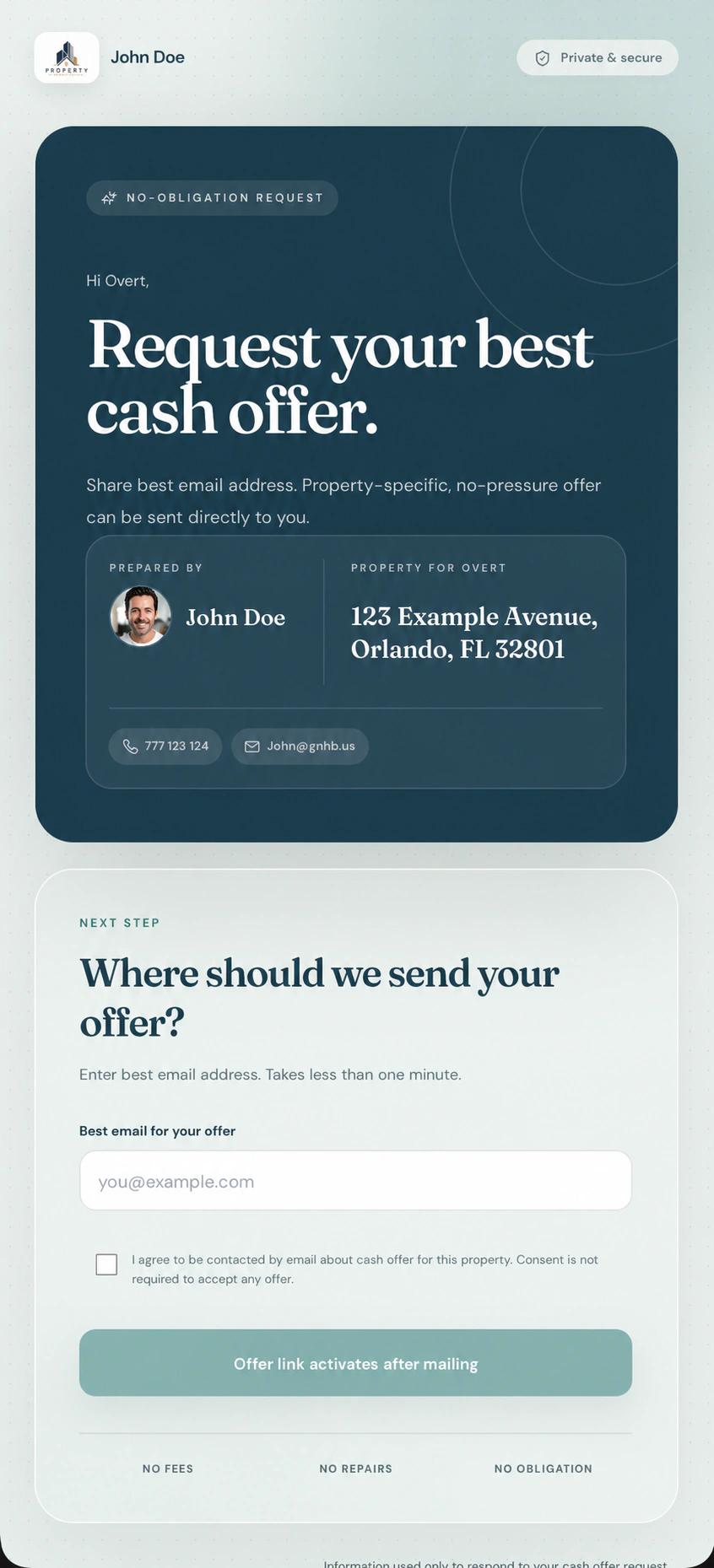
Homeowner sees own name and property plus investor logo, headshot, contact details, and chosen brand colors. Email form turns interest into request tied to property.
Homeowner + property personalizedInvestor brand carried throughPrivate email request form
Step 9 · Lead activity
A submitted request reaches you immediately.
The QR page collects the homeowner’s request. After submission, SCOUTRE sends “Cash offer requested” to your phone and records it on the lead.
Phone pushProperty identifiedVisible in My Captures
Step 10 · Mail HQ
Every piece, response, and setting stays findable.
Search mail by homeowner or property. Review individual pieces, campaign touches, and cash-offer requests. Reuse saved branding, templates, and offer-email setup.
Mail activity searchableCampaign touches togetherBrand + template settings reusable
One connected curb-to-conversation workflow
See the property. Build mail around it. Qualify the seller from the response.
SCOUTRE keeps the field photo, property data, creative, mailing activity and homeowner intent attached to one lead from start to finish.
01IN THE FIELD
Capture it. Read distress context.
Save the house and photo, then see high-priority property signals before choosing outreach.
Pre-foreclosureInheritedTax lienAbsenteeVacant
02BUILD THE CREATIVE
Make every piece feel one-to-one.
Choose a ready-made design or upload your own template. Combine postcard size, photo, font, handwriting, ink, headline and dynamic text for that homeowner and property.
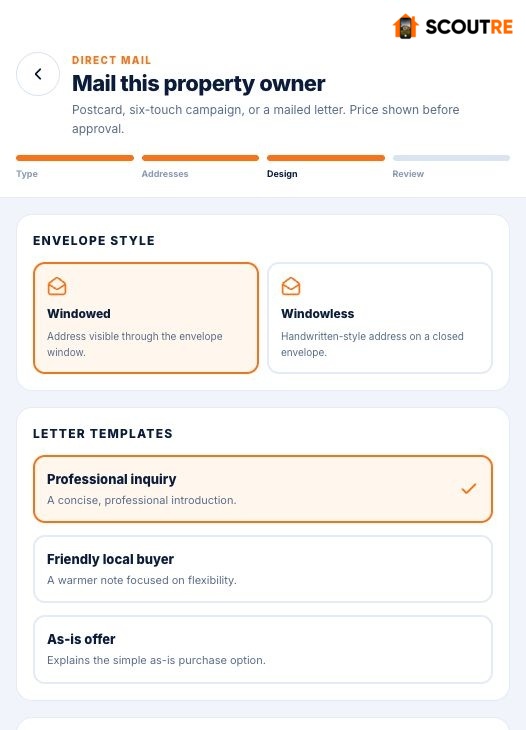
Mail one postcard, build a six-touch sequence or send a letter with a windowed or handwritten-style windowless envelope.
PostcardSix-touch campaignWindowed letterWindowless letter
04PROOF + SEND
Know what goes out.
Review the exact proof, production total and schedule before approval. Delivery scans keep physical-mail progress visible.
Final proofPaymentScheduleDelivery tracking
05HOMEOWNER SCANS
Open their private cash-offer page.
Unique QR opens a page personalized with homeowner, property, investor logo, headshot, contact details and selected brand colors.
Their nameTheir propertyYour brandEmail request
06INTENT RETURNS
Work a qualified seller lead.
When the homeowner submits the cash-offer request, SCOUTRE sends “Cash offer requested” to your phone and returns the request to the same property inside My Captures and Mail HQ.
Private offer pageCash-offer requestPush notificationLead history
One connected path inside SCOUTRE: property seen in the field, property-specific mail, physical delivery, branded QR response and seller intent returned to the original lead.
01 · CAPTUREPhoto and property stay together.→
02 · PERSONALIZEMail looks built for one address.→
03 · CONVERTQR opens their private offer page.→
04 · QUALIFYSeller intent returns to the lead.
The captured-photo advantage
Make the mailbox feel property-specific before a word is read.
The same photo attached during the property visit can become the face of the postcard. A homeowner sees a familiar house, not a generic stock image.
Real postcard setup
Use the field photo already on the lead.
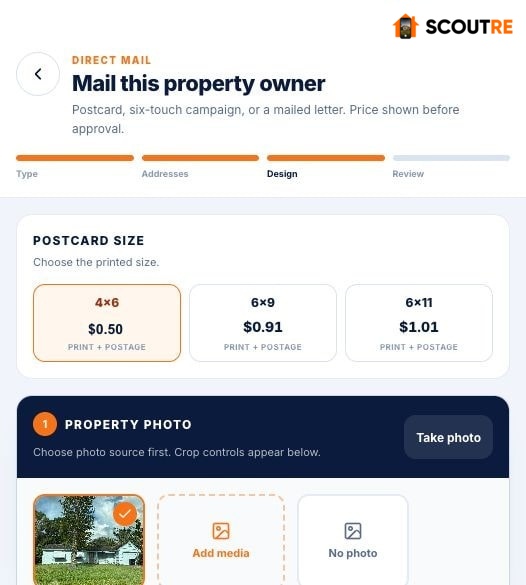
Select the captured image, take a new photo, add media from your library or continue without a photo. Then reposition and zoom the house for the finished design.
Three printed sizes: 4×6, 6×9 and 6×11
Ready-made templates or your own uploaded creative
Owner, property and investor details resolve automatically
Reposition and zoom the photo after choosing the template
Zoom or download the final front-and-back proof before payment
The photo can earn the first look. The homeowner still decides whether to respond.
Captured property photo selectedReal app screen
Real postcard examples · front and back
Mix the pieces. Make every send feel built for one property.
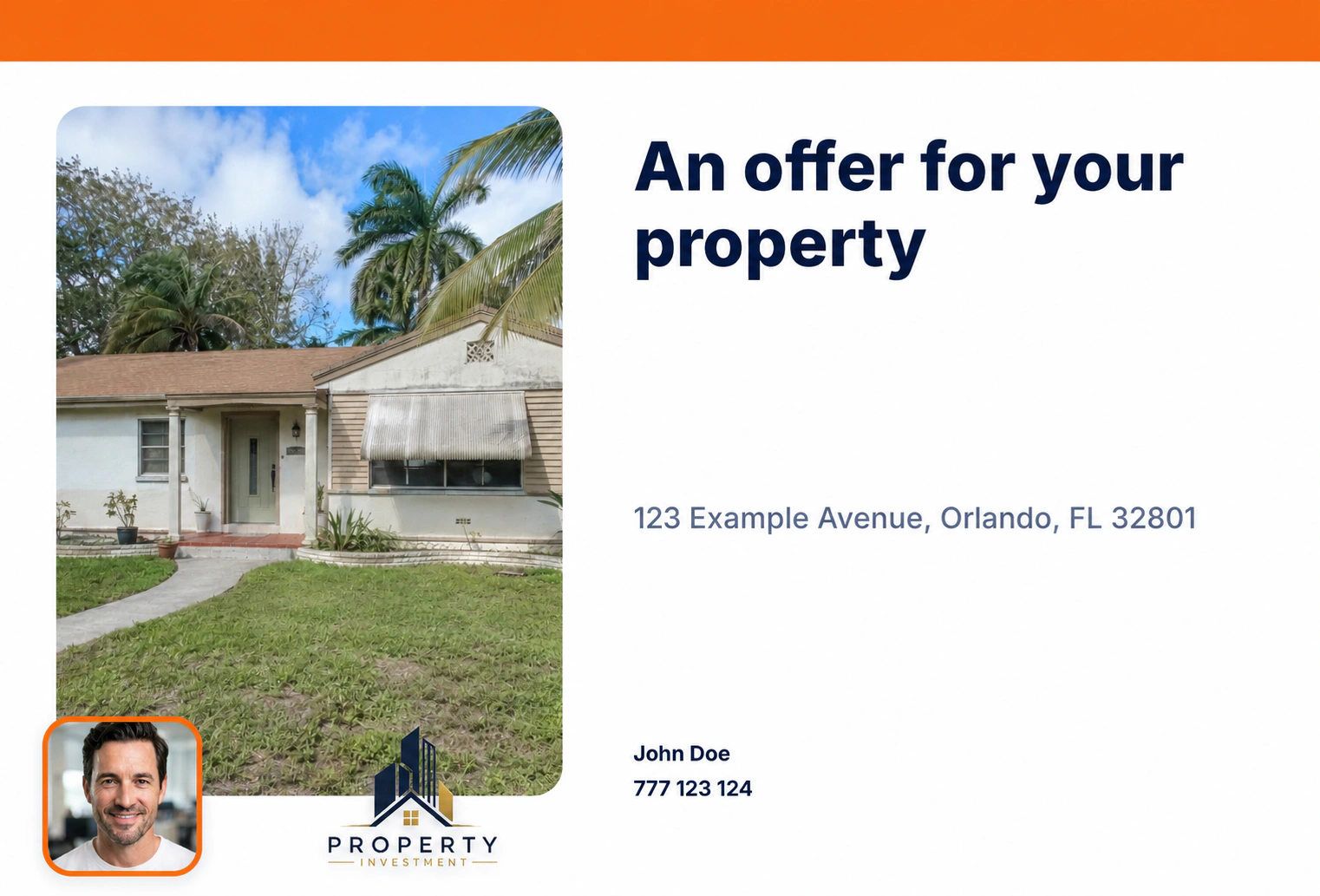
These examples show part of the creative range. Start with a SCOUTRE design or upload your own template, then combine the captured property photo, dynamic text, fonts, handwriting, investor branding and unique cash-offer QR.
A
Direct offerClear, property-specific opening
FrontCaptured property photo + investor brandBackHandwritten message + personalized QR
Real finished designs. Public-safe demo data. Select any front or back to open a full-size preview without leaving this page. Template library extends beyond these examples, and each six-touch send can use different creative.
Letters and envelopes · same connected lead
Postcards are one option. Send a real letter when the message needs more room.
Choose ready-made letter creative or upload your own. Personalize the homeowner, property, message, handwriting, ink, logo, headshot and QR response path—then choose the envelope and review the exact proof before sending.
MAKE IT YOURSTemplate, handwriting, ink and message can change.
Keep the branded footer and unique QR response path, or upload your own letter creative. Every result stays attached to the same homeowner and property lead.
Windowed letter · exact print proof
Address visible. Personal message inside.
The typed return and recipient blocks align with the envelope windows. Inside, the homeowner receives a high-touch handwritten-style message with your logo, headshot, contact details and their property-specific QR response path.
01 · PERSONALIZEHomeowner, property and message resolve together.→02 · MAILChoose letter, envelope and final proof.→03 · SCANQR opens their branded cash-offer page.→04 · QUALIFYEmail request returns to the original lead.
These are examples, not the limit. Combine different handwriting styles, ink colors, messages and templates—or upload your own letter creative. Letter and postcard requests return through the same personalized QR offer page.
One lead · multiple formats
Postcard, six-touch campaign or mailed letter.
These are the actual SCOUTRE screens. The app keeps the property, recipient, return address, creative and proof in one connected workflow.
01 · Postcard
Use the real property photo.
Choose a ready-made design or upload your own, edit the message and see the finished property-specific creative.
02 · Campaign
Plan six touches at once.
See every mailing date and the full campaign cost before you approve anything.
03 · Mailed letter
Send a real letter, too.
Choose windowed or handwritten-style windowless, then use ready-made letter creative or bring your own template.
Campaign creative control
Six sends do not have to look like the same send repeated.
SCOUTRE schedules exactly six postcards, 21 days apart. Every touch can use its own design, message, photo and headline, while the property and lead remain connected.
Choose a different design, message, photo and headline for every send
Mix property-photo, simple-offer, neighborhood-buyer and bold-offer layouts
See all six mailing dates before approval
Keep every send and response attached to the same property lead
Six touches. Six creative decisions.Stay recognizable without making every mailbox moment identical.
Choose each campaign touch separatelyReal app screen
Handwriting that avoids the static-font look
Choose the style. Then let realism introduce natural variation.
Letters and postcard backs can use SCOUTRE handwriting styles, five ink colors, adjustable font sizing and a Realism control that adds natural variation to supported handwriting styles.
Windowless envelope realism
Many small stroke-position changes make the address feel less mechanically repeated.
Choose a windowless envelope for a handwritten-style closed envelope. The Realism setting adds point-by-point variation to supported writing styles, and the final production proof shows the exact result before payment.
16 SCOUTRE handwriting styles, plus legacy options
Blue, black, green, purple or red ink
Auto, small, medium or large font sizing
Natural variation visible in the final proof
Choose style, color, size and realism1 / 2
Private branded cash-offer page
When they scan, nothing feels generic.
One Mailing Profile connects your company logo, personal headshot and selected colors to postcards, letters and every personalized cash-offer page. Each homeowner sees their name, their property and the investor behind the offer—then requests the next step with one email field.
What recipient sees after QR scan
Mail gets attention. Personalized page builds trust.
“Scan to see your cash offer” opens a private page matched to that exact mailing. Your company logo, headshot, contact details and chosen color theme appear beside the homeowner’s name and property—without SCOUTRE branding between you and the seller.
Logo, headshot and investor contact
Homeowner and property personalization
Sixteen paired color themes
Email-only cash-offer request
Real recipient experience. Synthetic property address.Your selected brand theme controls the complete page. Mobile layout automatically stacks for clear scanning and response.
Recipient-specific experience
Their name and property. Your company and face.
Page shows the homeowner's first name, matching property address, investor identity, company logo and personal headshot. The homeowner sees a property-specific experience from the investor—not SCOUTRE or the mailing provider.
Scan to see your cash offer.[Property street and city]
Choose one paired theme and preview the complete homeowner page before sending. Offer page stays unavailable until associated mail piece has been sent.
01
Their name. Their property.
The landing page automatically displays the recipient's name and the matching property address from the saved lead.
02
Email-only offer request
Homeowner enters best email, confirms contact consent and submits without phone number or account. Confirmation appears immediately.
03
Intent returns to your workspace
The homeowner's email saves to the lead, the investor receives a push notification, and activity appears in both My Captures and Mail HQ.
Clear signals, honest labels
Delivery and submitted seller intent stay separate.
The lead history says exactly what the data supports. SCOUTRE does not call a postal delivery scan a physical “open.” A cash-offer request appears only after the homeowner submits the form.
One qualified action · one instant push
Know when the homeowner asks for an offer.
The QR code opens the private page. A phone push fires only after the homeowner submits the cash-offer request.
No notification for page open alone. Submitted request stays timestamped inside the homeowner and property lead.
01 · Delivery
USPS/provider scan
The mail piece was recorded as delivered by the postal provider.
02 · Private page
Personalized offer page
The QR code opens the homeowner’s property-specific cash-offer experience.
03 · Intent
Cash-offer request
The homeowner submitted an email and explicitly asked the investor for an offer.
Know which piece workedEach postcard, letter and campaign touch reports back to the correct property.Respond while interest is freshReceive “Cash offer requested” when the homeowner submits the request.Keep new contact organizedSubmitted email saves to the lead without creating duplicate contact records.See activity where you workReview mail and cash-offer requests in both My Captures and Mail HQ.
Mail HQ
Know what went out. See who responded.
Mail HQ brings every postcard, letter and campaign into one clear workspace. Find any mailing, spot homeowner activity and open the related lead when it is time to follow up.
01 · STAY ORGANIZED
Find any homeowner or property.
Search every postcard, letter and campaign without digging through separate tools.
02 · SEE MOMENTUM
Understand what happened next.
See what is scheduled, on the way, delivered, requested or waiting for attention.
03 · FOLLOW UP
Open the right lead immediately.
Move from homeowner activity to property details, contact information and next action.
What did I send?Did homeowner engage?Who should I follow up with?
Mail operations, visible at a glance.Review production stages, search mail and isolate delivered pieces, cash-offer requests or work needing attention before opening a homeowner record.
Current in-app production pricing
Printing and postage shown before approval.
Direct-mail production is separate from the $79 SCOUTRE subscription. The current live app verifies addresses, shows the exact proof and complete print-plus-postage total, then uses secure Stripe checkout.
POSTCARD
4×6
$0.50print + postageSix touches: $3.00POSTCARD
6×9
$0.91print + postageSix touches: $5.46POSTCARD
6×11
$1.01print + postageSix touches: $6.06MAILED LETTER
Windowed or windowless
$0.83starting priceExact envelope price shown in the app
SCOUTRE currently adds no markup to mailing-provider cost. Prices shown here reflect the live app capture on July 22, 2026 and may change with production or postage costs. The app total before payment is authoritative.
Direct Mail FAQ
Know exactly what happens before you send.
Does the postcard use the photo I took at the property?
Yes. Choose the captured property photo already attached to the lead, reposition or zoom it for the selected design, and review the final proof. You can also take a new photo, add media or continue without a photo.
Can I upload my own postcard or letter template?
Yes. Start with SCOUTRE's ready-made creative or upload your own template. Then combine it with the selected property photo, dynamic homeowner and property text, investor branding and the unique QR response path for that lead.
Where does the homeowner and property personalization come from?
Direct Mail uses the saved lead connected to SCOUTRE property intelligence. The broader data foundation represents 160M U.S. properties, approximately 95% coverage. Available fields and refresh timing vary by county and source.
Can every send in the six-touch campaign use a different template?
Yes. Choose which postcard template belongs to each of the six scheduled sends, so the creative can change while all activity remains connected to the same property lead.
What makes the handwriting look more realistic?
Choose a handwriting style, ink color and size, then enable Realism. Supported handwriting styles receive natural point-by-point variation. The final proof shows the production result before payment.
What happens after the homeowner scans the QR code?
The QR code opens the personalized cash-offer page. No notification fires for the page open alone. When the homeowner submits the request, SCOUTRE sends the investor a “Cash offer requested” push and records the request on the same property lead.
Can the cash-offer page use my company branding?
Yes. Upload a company logo and personal headshot, then choose from 16 professionally paired color themes. The homeowner sees the investor identity, homeowner name and matching property—not SCOUTRE or mailing-provider branding.
Do my logo and headshot have to appear on every mail piece?
No. Both always brand the personalized QR cash-offer page, while each postcard or letter includes separate on/off controls for printed logo and headshot placement.
Does the cash-offer page collect a phone number?
No. Current form asks only for homeowner's best email address and requires contact consent before submission.
What can I manage in Mail HQ?
Search mail by homeowner or address, filter by format or status, review individual campaign touches, see amount paid and dates, track available production and delivery updates, view cash-offer requests, and open the related property.
Does SCOUTRE track physical mail opens?
No. A provider or USPS scan is a delivery event, not proof that a person opened or read the piece. SCOUTRE alerts you when the homeowner submits a cash-offer request.
Capture the property once. Use it all the way through the follow-up.
Turn the field photo into recognizable mail, make the homeowner’s next step clear and bring the response back to the lead.