U.S.-based human support
Available 7 days a week · 9 AM–5 PM Eastern Time7 days · 9 AM–5 PM ET [email protected]
Learn

The SCOUTRE
field playbook.

Learn how strong scouts plan and record routes with Drive Scout, capture a property in 60 seconds, work every lead from the curb and run follow ups like professionals.

Lesson 01

Plan it. Record it. Cover new ground.

Choose target streets, start Drive Scout before rolling and use live route coverage to see the ground you have already scouted.

Pick aging streets

Target neighborhoods built 25 to 50 years ago with long ownership. That's where you find high equity, deferred maintenance and owners ready for a change. Newer subdivisions look pretty and pay nothing.

Start Drive Scout

Tap Drive before you roll. Your session tracks elapsed time, distance and properties captured, with Pause, Resume and End controls available while you move between Capture and My Captures.

Read route coverage

Your current drive appears orange and previous drives appear red. The coverage corridor helps you spot streets already scouted, so you can choose fresh ground or return intentionally for a follow up.

Drive Scout workflow

Start, scout and save every route.

Start a session from the persistent Drive control. The map follows your position and direction, with this drive in orange, previous drives in red and a shaded corridor around covered streets. Use that contrast to choose fresh ground or recognize an intentional repeat.

  • Start before the vehicle moves.
  • Pause or resume while duration, distance and property count stay visible.
  • After parking, tap Property in Front to open the curbside parcel without ending the drive.
  • End the drive to save its route; offline data can sync after reconnecting.

Drive safely: set controls while parked, or let a passenger operate the app while the vehicle is moving.

Lesson 02

The 60 second capture.

Speed matters. The faster each capture, the more street you cover. This is the sequence.

Confirm the parcel

Open the app, tap the best guess parcel. Check the street photo matches what's in front of you. 5 seconds.

Rate and tag

Distress 1 to 5, then tap every observation you see. Tarp on roof plus overgrown lawn plus mail piling up is a completely different lead than peeling paint alone. 15 seconds.

Photo, voice, save

One photo from the curb, one voice note with anything a checkbox can't hold, hit Save. 40 seconds and you are rolling to the next one.

Golden rule: capture first, decide later. If it made you slow down, it goes in the app. The equity data will tell you tonight which ones deserve your energy, and dead leads cost you nothing.

Lesson 03

Read the numbers before you knock.

Know what the signal means

Clean property data becomes a faster lead decision.

SCOUTRE cleans and organizes records across 160M U.S. properties, then surfaces signals active investors ask for first: pre-foreclosure, inherited, tax lien, lien, absentee owner and vacancy—plus equity, buyer, deed, financing and MLS context.

160MU.S. properties
≈95%property coverage
800+county partnerships
Dailysale and ownership processing
SIGNALSRead these first
PreforeclosureTime-sensitive distress
Inherited Tax lien Lien Absentee owner Vacant
Public recordsTypically weekly to monthly by county
Participating MLSReal-time listing refreshes
Investor viewReadable signals instead of raw record fields

Coverage, fields and refresh timing vary by county, source and participating MLS board.

Twenty seconds with the Valuation & Equity card tells you whether to invest ten more minutes:

  • High equity + long ownership: bought decades ago, little or no mortgage. Maximum flexibility on price and terms. Your A leads.
  • Rent and market context: estimated rent, fair market rent, gross yield, price per sqft and nearby sold comps help you decide whether the property deserves a deeper rental or acquisition analysis.
  • Tax and assessment: compare market value, assessed value and annual property tax before estimating carrying costs.
  • Sale and deed history: recorded dates, prices, deed types and prior transfers show how the property changed hands.
  • Off market + visible distress: nobody else is competing for this seller yet. Move fast.
  • Recently sold or low equity: little room for a discount. Capture it, mark it, move on.
  • On MLS: an agent already has it. Usually a pass for off market strategies, but the auto tag saves you an embarrassing call.

Example from the field: purchased in 2000 for $80,000, estimated value $341,000 today, zero open mortgage, owner occupied for 25 years, visible neglect. That is a textbook A lead, and SCOUTRE hands you every one of those facts at the curb.

Lesson 04

Open the conversation from the curb.

The curbside call

Trace, tap Call, and open with location honesty. It is your unfair advantage: "Hi, is this Diane? My name is Mirko, I'm actually standing outside your property on Sablewood Avenue right now. My wife and I buy houses in Port St. Lucie and I wanted to ask if you'd ever consider selling." Specific, local and impossible to confuse with a call center.

The curbside text

No answer? Tap Text: "Hi Diane, this is Mirko. I was just in front of your house on SW Sablewood Ave. We're a local family that buys homes as is in Port St. Lucie. If selling has ever crossed your mind, I'd love to chat. No pressure either way." Then log the outreach and set a follow up for 3 days.

The door and the neighbor

Knock first when the car is in the driveway. No answer? Sticky note on the door, tag "Left sticky note" and "Knocked, no answer". A neighbor outside is gold: "Do you know the folks at 1872? Been trying to reach them." Drop what you learn into a voice note before you forget it.

Voice note everything

The moment you hang up or step off the porch, record: who you spoke to, what they said, objections, timeline, personal details. Months later, opening a follow up call with "Last time you mentioned your son was moving to Georgia" is what separates closers from callers.

Read the contact data before you act

One trace. Nationwide reach. Four phone-screening signals.

SCOUTRE searches a skip-trace source covering 150M+ U.S. residential property records. Provider customers report 70–95% match rates depending on input quality, while returned phones can carry Federal DNC, State DNC, DMA suppression and known-litigator flags.

150M+residential records in every state and U.S. territory
70–95%provider-reported match range; actual results vary
4 checksshown separately at phone level
1 cardphones, emails, type and flags stay with the lead

Provider-reported results vary with input completeness, owner mobility, recent transfers, geography and source coverage. A match is not guaranteed.

Your outreach, your responsibility. SCOUTRE delivers contact data and screening flags; it does not create consent or a legal right to call, text or email. Before contacting anyone, confirm the lawful basis and any permission required, follow federal and state rules, maintain your own do-not-call requests, and stop when someone asks. When in doubt, knock or send a letter.

Lesson 05

The follow up machine.

Most sellers say yes on touch 4 to 7. The investors who win are simply the ones still there.

The cadence

Contacted but not ready: follow up in 30 days. Spoke and there's interest: 3 days. No contact at all: re trace and try again in a week, then monthly. Every follow up gets scheduled in the app the same minute it's decided, synced to Google or Apple Calendar so it interrupts your real life.

Status discipline

Advance the status the second something happens — Contacted, Analyzing, Offer Sent, Negotiating, Under Contract. Then Monday morning, filter by Overdue and Today and work the list. Your pipeline runs itself because you fed it in real time, not from memory at midnight.

Mark leads Dead fast

Seller says never, house sells, numbers don't work: mark it Dead without mercy. A clean pipeline of 40 real leads beats a swamp of 400 maybes. Dead leads stay searchable forever if things change.

Lesson 06

Underwrite before you offer.

A lead becomes a deal when the numbers say so. SCOUTRE's guided deal analysis keeps you honest — run it before you name a price:

  • ARV from comps you trust — with a confidence score. Pull nearby sold comps, cut the ones that don't match, add your own — your ARV is the average of what you kept, and a confidence score tells you how solid that number is before you lean on it.
  • Repairs in two speeds. Fast per-square-foot mode — light ($15–25/sqft), moderate, heavy, or full gut ($75–120/sqft) — or a detailed line-item breakdown across 16 categories when you need it.
  • Motivation is a compass, not a calculator. Score the seller from urgency, consequence, distress and your field notes — it prioritizes your follow ups, but it never changes your offer math.
  • Every exit on one screen. Wholesale, Fix & Flip, Rental, Creative Finance, Double Close and Referral / JV — each computes its own maximum seller price, so you can see which exit makes the deal.
  • A clear verdict, and the lower ceiling wins. The formula meets your exit-based ceiling; whichever is lower is your max offer — and the app calls it: strong, possible, thin or pass.

When the numbers work, generate the offer email signed as you and export the whole deal as a shareable PDF — no spreadsheet in between. Rule of thumb: if you can't say which comps set your ARV and which ceiling capped your offer, you're not ready to make it.

Lesson 07

Turn a captured lead into personalized mail.

Use Direct Mail when you want the property record, captured photo, delivery signal and homeowner response to stay connected.

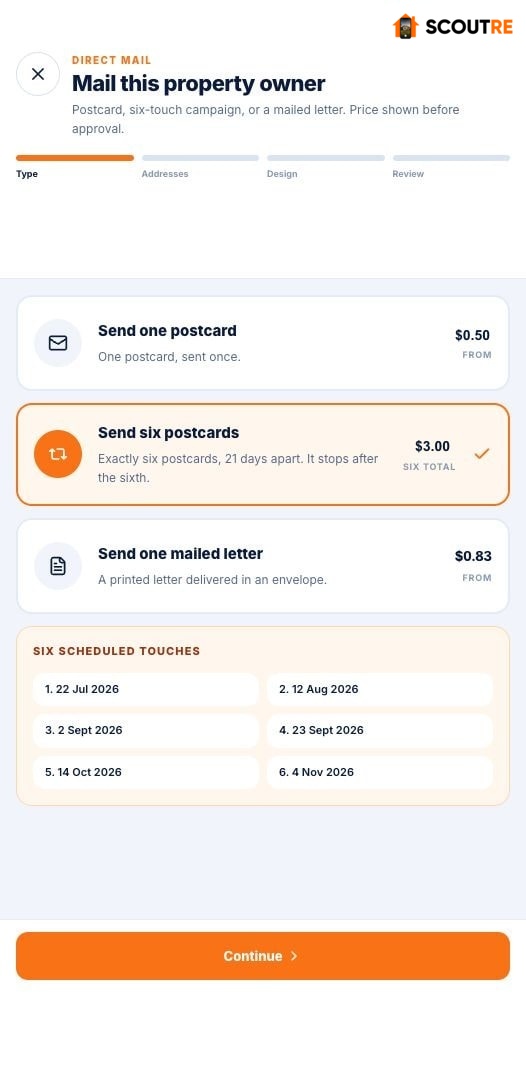
  1. Open the property lead. Choose Send direct mail.
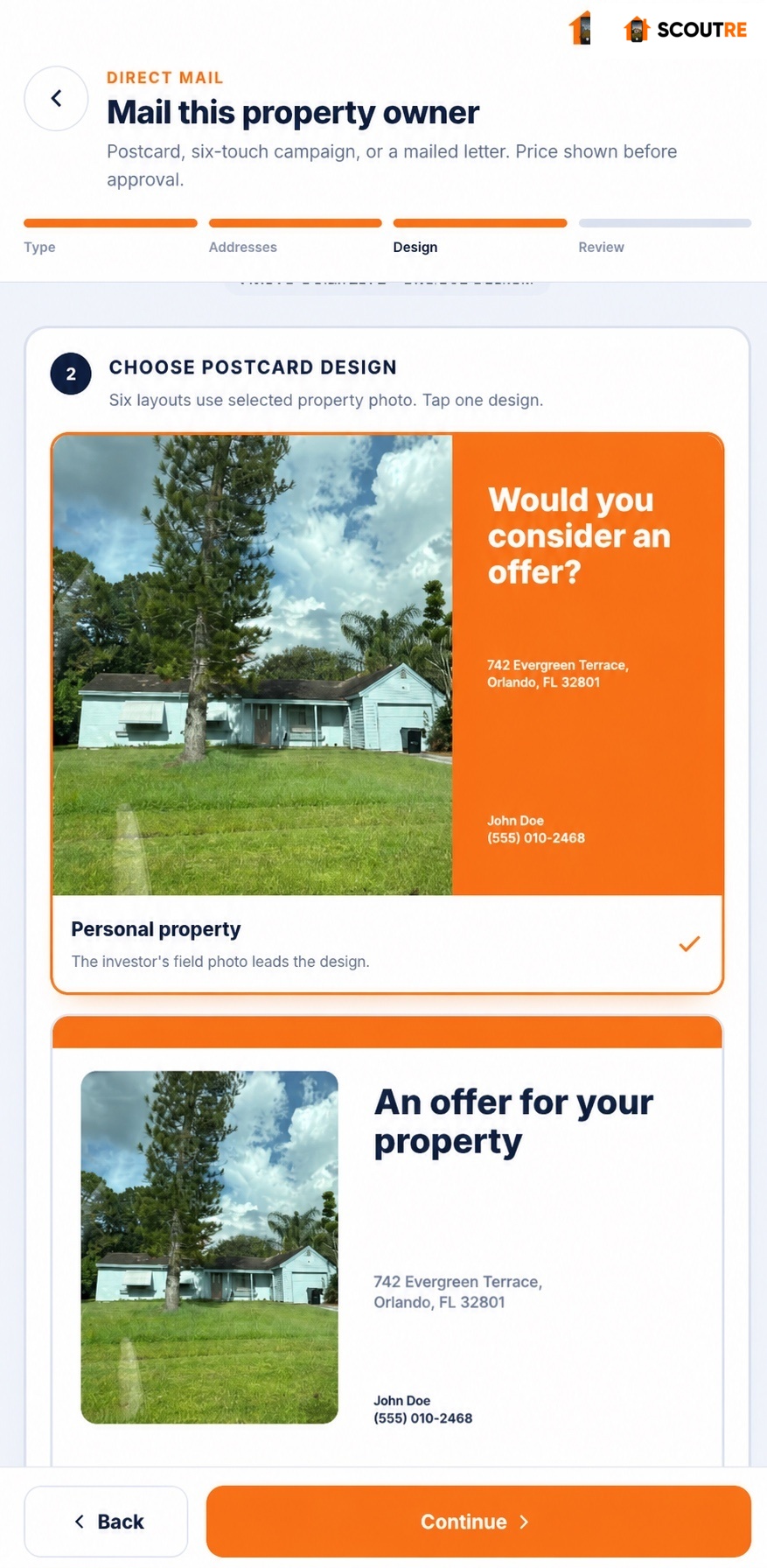
  2. Pick the format. Send one postcard, exactly six postcards 21 days apart, or one mailed letter.
  3. Verify both addresses. The mail-to address comes from the lead; the return address comes from your Mailing Profile.
  4. Make it recognizable. Select the photo you captured at the property, then choose the size and template. In a six-touch campaign, assign the creative for each send.
  5. Review before paying. Check the exact printed proof, price and campaign dates.
  6. Watch the right signals. Provider/USPS scan means delivery. A submitted cash-offer request means the homeowner asked for an offer.
  7. Follow up from the lead. Opening the QR page alone does not send a notification. Submitting the homeowner request sends “Cash offer requested” to your phone and keeps the request attached to the same lead.

Mailbox principle: a homeowner is more likely to recognize a piece that shows the same property they own. Use the captured photo to earn attention, then make the next step clear and low-pressure.

Real SCOUTRE Cash offer requested push notification identifying responding property
Read the signal correctly.The phone push appears after the homeowner submits the cash-offer request.
Open the Direct Mail guide
Lesson 08

A week in the life of a SCOUTRE user.

Mon · Route day

Check the map view, pick two streets you have never covered plus one follow up street. 90 minutes of driving, 25 captures, 6 traced and contacted from the curb.

Tue · Desk sweep

Filter New captures, review equity, mark the low equity ones Dead, queue the A leads. Text the traced owners you could not reach live.

Wed to Fri · Follow up filter

Open Overdue and Today each morning. Calls first, texts second. Every outcome updates a status and books the next touch before you close the app.

Sat · Door day

Saturday morning, route back to the A leads with cars in the driveway. Knock, talk, voice note. This is where contracts get signed.

You know the playbook.
Now get the equipment.

$79 per month. One complete software plan with unlimited leads and contact lookups. Your first drive with SCOUTRE will feel like cheating.

Start free
US-based customer service Questions? Email our support team. Available 7 days a week · 9 AM–5 PM Eastern Time