Stand in front of any house and SCOUTRE identifies the exact parcel
Property in Front is how SCOUTRE opens a property without an address. Stand in front of the house, and GPS identifies the exact parcel across 160 million US properties, returning the owner, the owner's mailing address, estimated equity, the mortgage position and the 16 distress signals. No address is typed, no parcel number is looked up, no county is chosen. That is how you find motivated sellers on a street you are already driving. Coverage varies by county.
Parcel apps can show you the parcel you are standing on. SCOUTRE takes that property into the rest of the job — the signals, the owner's phone number, the pipeline and the mail. The page below explains the mechanism, the cases where it works and the cases where it does not, and what to do instead when it fails.
What is Property in Front?
Property in Front is a way of opening a property record by physical position rather than by address. You stand in front of a house, and SCOUTRE matches your location to the parcel you are looking at, then returns the full record for that parcel across 160 million US properties. Nothing is typed. Coverage varies by county.
The distinction matters because every other route into a property record starts with a string of text. An address has to be visible, legible, correctly formatted and correctly matched. A position does not. You already know which house you mean, because you are standing in front of it.
Stand at the kerb. No address typed.
Location, not text, is the input. The phone reports where it is, that position is matched against parcel data covering 160 million US properties, and the record for the matched parcel opens. Four steps, none of which involve reading a house number off a mailbox. Coverage varies by county.
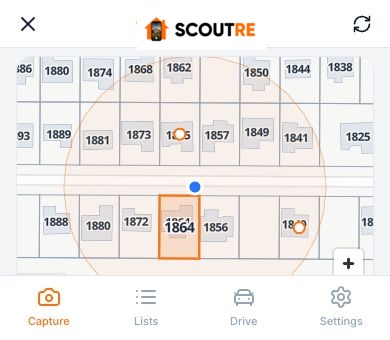
Stand in front of the house
Open the app at the curb with the property in view. No address, no parcel number and no county selection is required.
GPS identifies the parcel
Your phone reports its location, and that position is matched against parcel data. Coverage varies by county.
The property record opens
Owner name, owner mailing address, owner occupancy, estimated value and equity, the mortgage picture and the 16 distress signals return on the matched parcel.
You add what only you can see
Rate distress from 1 to 5, take photos, record a voice note, tag what you see, and save the property into your own pipeline.
The full property record, opened by position
A GPS match returns the same record a typed address returns. Owner name, owner mailing address, owner occupancy, estimated value, estimated equity, estimated mortgage balance, lender, lien position, sale and loan history, beds, baths, square footage, year built, MLS status and nearby comparable sales, plus 16 distress signals. Availability varies by property, county and source.
Equity and mortgage figures are estimates derived from recorded loan history and assessed values. They are not statements of account balance. All 30 fields are set out in what a property record contains, and the flags themselves in the 16 distress signals.
All 16 signals on the house, before you knock
A motivated seller is an owner whose circumstances decide the sale rather than the asking price. Standing in front of the house, Property in Front opens the parcel and SCOUTRE returns the 16 distress signals on it: preforeclosure, probate, a tax lien, vacancy, absentee or out-of-state ownership among them. The tired house you stopped for either carries one of those flags or it does not, and you know before you knock. Availability varies by property, county and source.
Where address entry breaks and a position match does not
Property in Front works on a corner lot, a house with no visible number, and a street you have never driven. Those three cases break address entry and none of them break a position match. It also works on a house you noticed from the car, on a rural road with no signage, and mid-block where the neighbours' numbers are hidden behind hedges.
The pattern underneath is simple: the harder a house is to name, the more valuable it is to point at. Neglected properties are the ones with a missing number, an overgrown yard and a mailbox knocked flat.
How do you know it matched the right house?
SCOUTRE shows the matched address on the record, alongside Street View imagery of the property, so you confirm the match with your own eyes before you save anything. If the match is wrong, you type the address instead and the record reopens on the correct parcel. Nothing is committed to your pipeline until you save it.

Captures carry their own evidence too. Every saved property stores GPS location, capture date and time, your photos, your voice notes and your 1 to 5 distress rating, so the record shows where you were standing and what you saw when you stopped.
Can you identify a property at the curb without an app?
Yes, in two steps rather than one. Write the address down, or drop a pin in your phone's map app, then look the parcel up later on the county's own site. County assessors and property appraisers publish parcel viewers, most of them map-based, and most of them free to search one property at a time.
Philadelphia publishes a map-based parcel search at property.phila.gov, and Cook County publishes assessments and parcel detail at cookcountyassessor.com. Both are free, both are authoritative for their county, and both require you to already know which parcel you mean.
If you are checking one house once, that route costs nothing and works fine. It stops working when there are twenty houses from Saturday's drive and none of them have a number you could read.
When does Property in Front not work?
Position matching has real failure modes worth knowing before you rely on it. A street canyon degrades GPS accuracy. A narrow street can put you between two parcels. A large rural parcel may set the house far back from where you stopped. On a multi-unit building SCOUTRE cannot tell which unit you mean. Coverage varies by county.
The honest fallback in every one of those cases is to type the address, which is what nationwide property search is for. With no signal at all, captures and photos save to your phone and upload automatically when the connection returns; the app marks them Saved on this phone.
The address you cannot read from the car
Typing an address assumes you can read one. On a working drive you often cannot: the number is missing, faded, on the side door, or on the wrong house entirely. Typing also costs attention you do not have while driving, and a mistyped street suffix opens a record for somebody else's home four blocks away.
The deeper cost is delay. A property you write down for later is one you research on Tuesday, if at all, which is how most drive lists die. Deciding at the curb, with the owner and the equity in front of you, is what the capability buys.
| Route | What you need | Time at the curb | Fails when |
|---|---|---|---|
| Write it down, look it up later | A readable house number | Seconds now, 20 minutes later | The number is missing, or you never go back |
| Type the address at the curb | A readable, correctly formatted address | 30–60 seconds | No visible number, corner lot, typo, wrong suffix |
| Property in Front | To be standing there | Seconds | Street canyons, condos, large rural parcels |
From capture to an 11-stage pipeline
The capture becomes a lead and everything else attaches to it. Photos, voice notes, the distress rating and the tags sit on the same record as the owner and the equity estimate. Run a trace, then move the lead through an 11-stage pipeline: New, Queued, Called, Texted, Contacted, Analyzing, Offer Sent, Negotiating, Under Contract, Closed, Dead.
Contact paths come from real estate skip tracing, and mail carrying the photo you just took goes out under direct mail postcards and letters. On the wrist, the Apple Watch app shows the property match and Save to CRM without taking the phone out.
The whole loop sits in what SCOUTRE does.
A property you already saved is recognised as the existing lead rather than duplicated, which matters on a street driven twice. Routes are covered in the driving for dollars guide.
What does Property in Front cost?
SCOUTRE costs $79 a month on one plan, after a 3-day free trial. Property in Front is included, and captures, leads, photos, voice notes, skip traces and re-traces are unlimited, so nothing about stopping at one more house costs extra. The only pay-per-use item is physical mail: postcards from $0.50 and handwritten letters from $0.83.
Print and postage are included in those prices, mail is charged only on approval, and every new user's first postcard is free. Terms are on SCOUTRE pricing.
Frequently asked questions
Do you need a street address to look up a property?
No. SCOUTRE finds a property two ways: stand in front of it and GPS identifies the exact parcel with no address needed, or type any US address from anywhere. The first route is Property in Front and it is built for the curb. The second is nationwide property search and it is built for the desk.
What happens if there is no cell signal?
Captures and photos save to your phone and upload automatically when the connection returns, and the app marks them Saved on this phone. Rural drives and dead zones do not cost you the stop. Drive Scout also records your route, distance, time and the number of properties you captured while you are out.
Do other apps show the parcel you are standing on?
Yes. Parcel-mapping apps show the parcel you are standing on, with owner name, acreage and zoning from county parcel data, then stop there. SCOUTRE carries that same property into the 16 distress signals, skip tracing with four-way DNC screening, an 11-stage pipeline and direct mail, without typing an address.
Does Property in Front work on apartment buildings and condos?
Less reliably. A multi-unit building maps many units to a single position, so a parcel match cannot tell which unit you mean, and a condo may be recorded as its own parcel or as part of a larger one depending on the county. On those properties, typing the address is the better route.
Is Property in Front the same as driving for dollars?
No. Driving for dollars is a practice: driving neighbourhoods looking for distressed properties, then finding the owners. Property in Front is one capability inside SCOUTRE that removes the address step from that practice, and it is equally useful walking a farm, knocking a street or standing outside a house a referral sent you to.
Can you use it from an Apple Watch?
Yes, and the Apple Watch app is included free. On the wrist you get the property match with photo and address, estimated value, equity, equity percentage, mortgage balance, lender, lien position, distress signals, last sale price, sale date, recording date, down payment, and Save to CRM. Property in Front works the same way from the wrist.
Can you tell a motivated seller from the kerb?
Partly. Standing at the house, Property in Front opens the parcel and the record shows whichever of the 16 signals the county published: preforeclosure, probate, tax lien, vacancy, absentee ownership. What the record cannot show is intent, and what your eyes add is condition. Signals describe circumstance, and availability varies by property, county and source.
The house in front of you, identified
3 days free, then $79 per month. Unlimited captures, the owner and equity picture at the curb, and 16 distress signals on every property you open. Cancel anytime.
Start free