U.S.-based human support
Available 7 days a week · 9 AM–5 PM Eastern Time7 days · 9 AM–5 PM ET [email protected]
Product

One app. From the property
to the signed offer.

Find motivated sellers one property at a time. Stand in front of a house, or type any U.S. address, and the property opens on your screen: owner, value, equity, estimated mortgage remaining, the 16 distress signals and comps. Drive Scout records the routes you cover. Then skip tracing, personalized postcards and letters with QR cash-offer requests, a guided deal analysis with a comp-based ARV and confidence score, every exit strategy on one screen, a ready-to-send offer email, a shareable PDF report, and a pipeline with calendar-synced follow ups — every feature in the order the street actually demands it.

Scouting live · at the curb

Real field footage — from the curb to the deal.

01 · Drive Scout

Know where you've driven. Cover new ground.

Start a driving-for-dollars session inside SCOUTRE, then let the live map keep your route and current position in view while you scout. Pause, resume or end the drive without leaving your workflow.

  • Start, pause, resume and end each route from inside the app
  • A live, direction-aware map follows your location while you drive
  • Your current route appears in orange, previous drives in red, with a transparent corridor showing general coverage
  • Use previous-drive coverage to choose a fresh street instead of repeating a block
  • See orange and red overlap when you intentionally drive a street again
  • See live drive time, distance and properties captured
  • Park, tap Property in Front, and open the curbside property without ending the drive
  • Drive controls stay available while you move between Capture and My Captures
  • Completed drives save to your history; active progress is stored locally and syncs when connection returns

Every session builds a usable record of where you've scouted, so you can see covered streets and decide where to drive next.

Live route map
Current route, nearby properties and drive controls stay visible.Drive → cover
Offline property capture · capture now, sync later

No signal? Keep capturing.

Save properties, photos, distress signals, observations, written notes, and voice notes without internet.

SCOUTRE stores everything securely on your phone using GPS. Keep working without waiting for service.

When connection returns, SCOUTRE matches property address, parcel, owner details, and available mailing address—then syncs everything into your CRM and driving route.

  • Capture properties using GPS without signal
  • Save photos and field notes securely on phone
  • Continue recording your driving route
  • Automatically sync when internet returns
  • Match property and owner details after reconnecting
  • Prevent duplicate uploads
Keep driving. Capture every opportunity.

Important: Maps and live property data require internet. Offline captures receive property and owner details after reconnection.

Real app · offline save confirmation
SCOUTRE mobile app confirming a property was saved on the phone and will upload automatically when internet returns
Saved on this phone. Keep capturing. Sync resumes automatically.
Five-step offline workflow

Signal drops. Workflow does not.

Steps 1–4 happen without internet. Step 5 resolves property and owner data after connection returns.

01

Tap Capture

Standing in front of house? Hit capture.

02

GPS pin ready

Zero signal needed. Phone locks exact coordinates.

03

Photo, note, tag

Add photos, distress signals, voice notes, and observations.

04

Saved on phone

Everything stays securely on device. Drive on.

05

Auto-sync

Address, owner, and mailing details fill automatically.

3 captures saved pending sync
Syncing 3 captures 3 captures resolved

No signalCaptures and photos save to your phone.

Back onlineEverything uploads automatically.

02 · Find deals on the map

Spot a house, tap it, capture it.

The in-app map shows property lines and house numbers, so you're always pinning the right parcel — not the one next door. See a tired roof, tap the house, and the lead starts. And because it's GPS-aware, it already knows the house you're standing in front of — the answer to who owns this property with no address typed.

  • Tap any property on the map to start a lead — no typing an address
  • Property outlines and building footprints so the pin lands exactly right
  • House numbers rendered right on the map, nationwide
  • Tag condition and distress on the spot, add a voice note or field note
  • GPS-aware — it knows the house you're standing in front of and flags its best guess
Stop → matched parcel
Stop at curb, confirm exact parcel, open matched property.Stop → know
04 · Instant property intelligence

Find motivated sellers before they list.

A motivated seller is an owner whose circumstances decide the sale, not the asking price. The moment you capture a property, SCOUTRE surfaces preforeclosure, inherited, tax-lien, lien, absentee-owner and vacancy flags inside the Property tab — six of the 16 distress signals — alongside value, equity, estimated mortgage remaining, deed history, tax and ownership in the same readable mobile record. Availability varies by property, county and source.

Cleaned · structured · built for fast property decisions

Investor signals. Priorities up front.

Read record-derived distress, ownership, equity, deed and financing indicators without interpreting raw county records. For the full field list and what each one changes, see who owns this property.

160MU.S. properties
≈95%property coverage
800+county partnerships
Real timeparticipating MLS feeds
SIGNALSReal SCOUTRE property UI
PreforeclosureTime-sensitive distress
Inherited Tax lien Lien Absentee owner Vacant
Also visible:Auction · Bank owned · Judgment · Death · Spousal death · Corporate owned · Investor buyer · Cash buyer · Free & clear · High equity · Quit claim · Sheriff’s deed · Deed in lieu · Trustee sale · Adjustable rate · Assumable · Private lender
Complete property signal library Signals appear when supported by available property and public-record sources.

Ownership & occupancy

Lives hereDoesn’t live hereOwner occupiedOut-of-state ownerAbsentee ownerIn-state absenteeCorporate ownedCash buyerInvestor buyerHomesteadHOA

Equity & financing

20% downHigh equity40%+ equityFree & clearAdjustable rateAssumablePrivate lender

Distress & legal

VacantPreforeclosureForeclosureAuctionBank ownedTax lienTax delinquentLienJudgmentSpousal deathProbateEvictionBankruptcyDivorceCode enforcement

Deed, listing & property context

Death transferInheritedQuit claimSheriff’s deedDeed in lieuTrustee saleExpired listingFSBOFlood zoneMobile home
Daily processingNew sales and ownership changes
County public recordsTypically weekly to monthly by source
MLS updatesReal time from participating boards

Coverage, fields and refresh timing vary by county, source and participating MLS board.

Mortgage intelligence

See what may still be owed—not only equity percentage.

SCOUTRE turns available mortgage records and loan terms into an estimated balance remaining. Review likely debt before deciding whether a lead has enough room for your strategy.

Balance remainingEstimated current loan balance
Time remainingApproximate years left and maturity date
Loan detailsLender, lien position, type and original amount
Loan historyRecorded dates and available mortgage events

Mortgage balances and time remaining are estimates based on available records and modeled amortization. Coverage varies. Verify material debt before making a transaction decision.

Real SCOUTRE app flow
Value, equity percentage and estimated loan balance remain distinct.

Valuation, equity & rental context

Estimated value, equity, payment and mortgage balance, plus estimated rent, FMR, gross yield and price per sqft. See both deal room and income potential before you knock.

Sale history & deed trail

Review recorded sale dates, prices, deed types, purchase LTV, down payment and prior transfers before you underwrite the lead.

Tax & assessment

See market value, assessed value, annual property tax and assessment year in the same mobile property record.

Building profile

Year built, beds, baths, finished sqft, stories, land use, zoning, subdivision, lot size and census tract.

Comps, instantly

Open nearby sold properties from the lead and run your comp analysis without leaving the mobile property record.

Market status

Existing, off market, on MLS or expired. Know instantly whether an agent already has it or the door is wide open.

Tappable Street View

Eyeball the house from the curb before you ever knock — Street View opens right on the property card.

Immediate investor signals

Pre-foreclosure, inherited, tax lien, lien, absentee owner and vacancy appear inside the property record—before you choose which door deserves attention.

Full property record
Signals, valuation, ownership, tax and property facts.Open → know
05 · Owner contact, built in

From owner contact to personalized outreach in a few taps.

Nationwide owner intelligence

150M+ residential records behind every one-tap trace.

Skip traces run against live sources at the moment you request them, not pulled from a pre-built list assembled months earlier and resold across subscribers. The app shows a “Recent Data” badge and a TRACED state on the record, so you can see what you’re working with. Hit rates vary by property and county.

Search owner contacts across every U.S. state and territory. Available phone numbers and emails return to the property card with phone type and four distinct screening flags—context you can read before choosing your next step. How the trace works, what it returns and realistic hit rates are covered in skip tracing for real estate.

A traced record is dated. A bought list is not. Re-trace any lead whenever you want — tracing and re-tracing are unmetered on the $79 plan.
150M+residential property records in the skip-trace source
Nationwideevery state and U.S. territory
70–95%provider-reported match rates; input quality matters
4 checksFederal, State, DMA and known-litigator flags
Federal DNC RegistrySeparate phone-level result
State DNC registriesIndividual state-list result
DMA suppressionDirect-marketing preference result
Known TCPA litigatorsAdditional phone-risk result

Provider-reported match rates vary by input completeness, owner mobility, recent property changes, geography and source coverage. A match is not guaranteed.

Live owner contact lookup
Run trace, inspect returned contacts, choose next action.Trace → connect
06 · Direct Mail

Turn direct mail into trackable seller conversations.

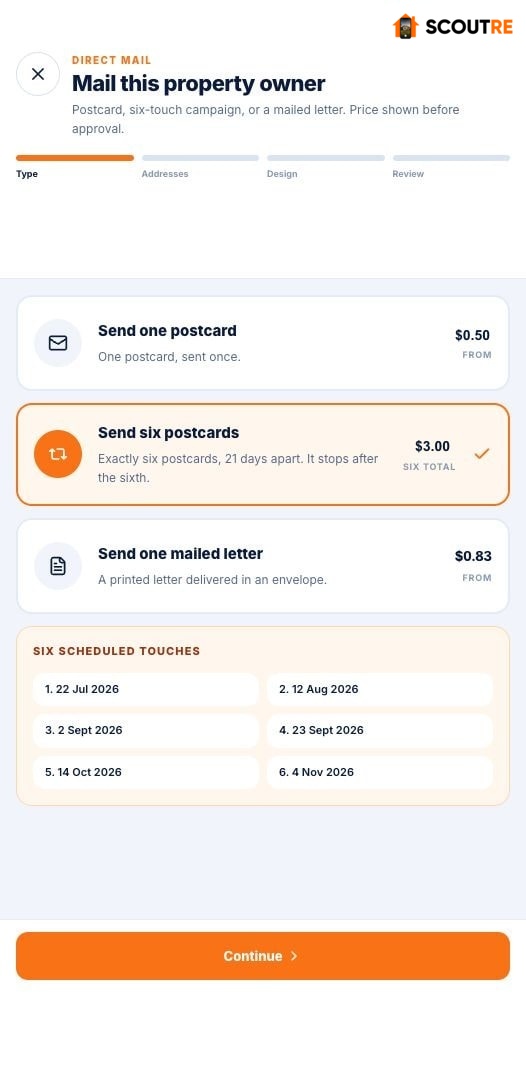
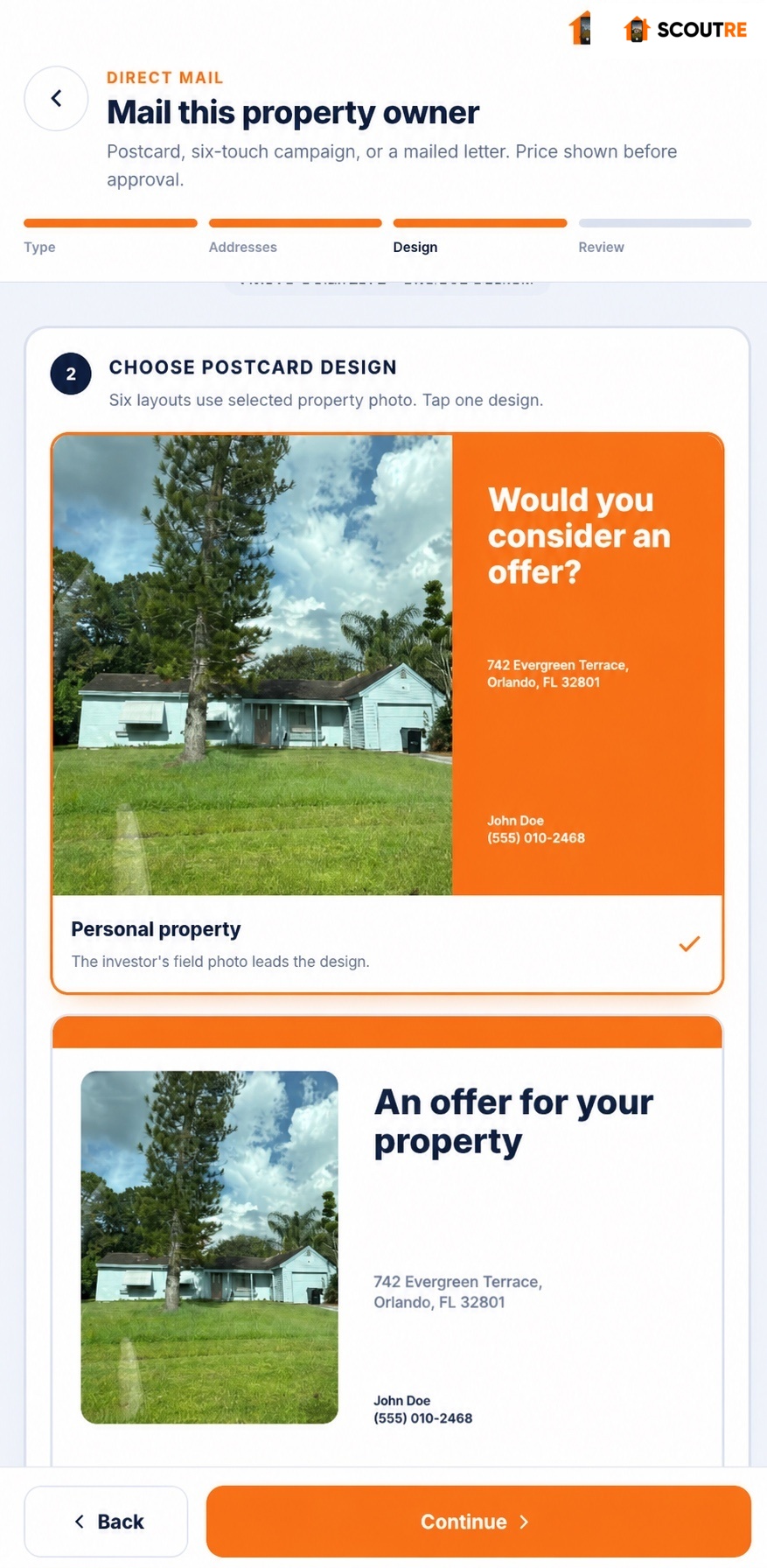
Create personalized postcards and letters from the captured property, upload logo and headshot once, and control print branding for every send. Track each piece through its available mailing stages—including USPS/provider delivery—then let its QR code open a homeowner-and-property-specific cash-offer page. When the homeowner submits the request, SCOUTRE sends a “Cash offer requested” push to your phone and records it in My Captures and Mail HQ.

01 · Mail status See where every mail piece stands.

Mail HQ keeps available production and postal updates connected to homeowner and property.

ScheduledProcessingShippedDelivered
02 · QR experience Open private offer page.

QR sends homeowner to branded, property-specific cash-offer page.

03 · Seller intent Receive qualified request.

Submitted request triggers phone push and returns to same lead.

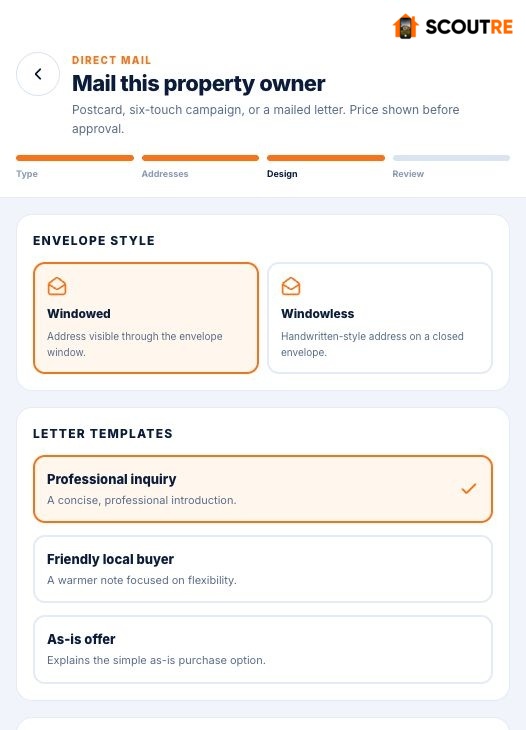
Open Direct Mail from the lead and choose one postcard, exactly six postcards 21 days apart, or a mailed letter. Recipient details come from the saved property record and the return address comes from your Mailing Profile.

  • 4×6, 6×9 and 6×11 postcards with printing and postage included
  • Customize templates, headline, message, property photo position, zoom and handwriting
  • Choose a different design, message, photo and headline for every six-touch campaign send
  • Upload company logo and personal headshot once in Mailing Profile
  • Turn logo and headshot on or off for each printed postcard or letter
  • Windowed or windowless letters with three starting templates
  • Final printed proof, verified addresses, complete price and secure Stripe checkout
  • Private page personalized with homeowner, property, investor, company, logo, headshot and 16 brand themes
  • Use “Scan to see your cash offer” to make next step unmistakable
  • Track available mailing stages and USPS/provider delivery status in Mail HQ
  • Receive “Cash offer requested” when the homeowner submits the request
  • Keep submitted email and response history attached to the same lead
  • Use Mail HQ to find every mailing and spot homeowners ready for follow-up

A submitted request is homeowner intent. SCOUTRE alerts you only after the homeowner asks for an offer.

See the complete Direct Mail workflow

Real SCOUTRE Cash offer requested push notification identifying responding property
Submitted intent reaches your phone.Real SCOUTRE push identifies responding property immediately. Cash-offer request stays attached to same homeowner and property lead.
From mailbox to seller intent

Every QR code opens an investor-branded, property-specific page.

The homeowner sees your logo, headshot and contact details beside their name and property. Your selected color theme carries your brand through the experience. After the homeowner submits the request, SCOUTRE sends a “Cash offer requested” push and returns the request to the lead.
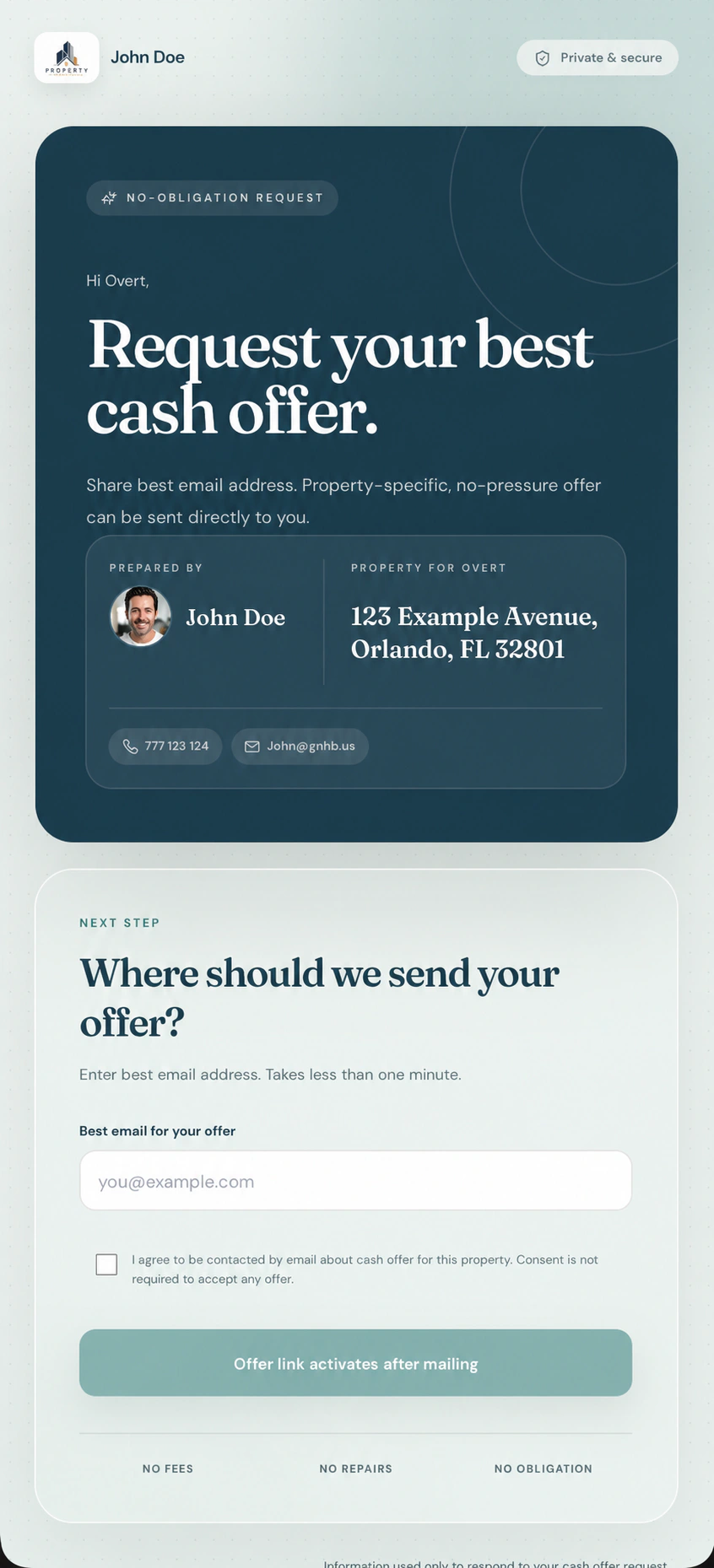
  • Personalized for each recipient
  • Logo, headshot and selected colors
  • No account or phone number required
  • Response returns to same lead
Personalized SCOUTRE cash-offer request page with investor logo, headshot, contact details, homeowner and synthetic property address
Real recipient experience. Synthetic property address.Responsive page uses investor-selected brand theme on desktop and mobile.
One qualified action · one instant push

Know when they ask for an offer.

The QR page opens without an alert. A phone push fires only after the homeowner submits the cash-offer request.

01
Cash-offer request submittedHomeowner confirms interest
Real SCOUTRE Cash offer requested push notification identifying responding property

No notification for page open alone. Submitted request stays timestamped inside the homeowner and property lead.

07 · Field documentation

Never forget which house was which.

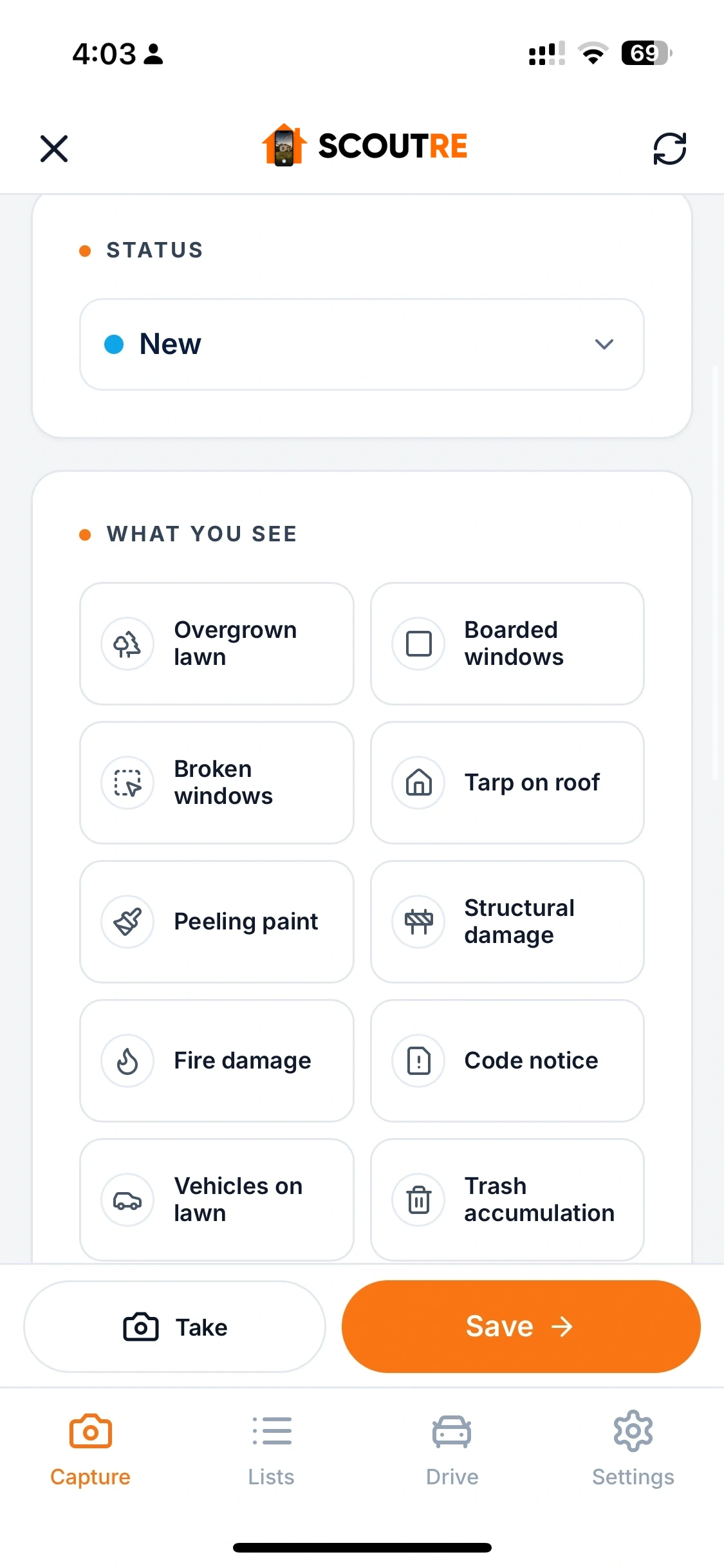
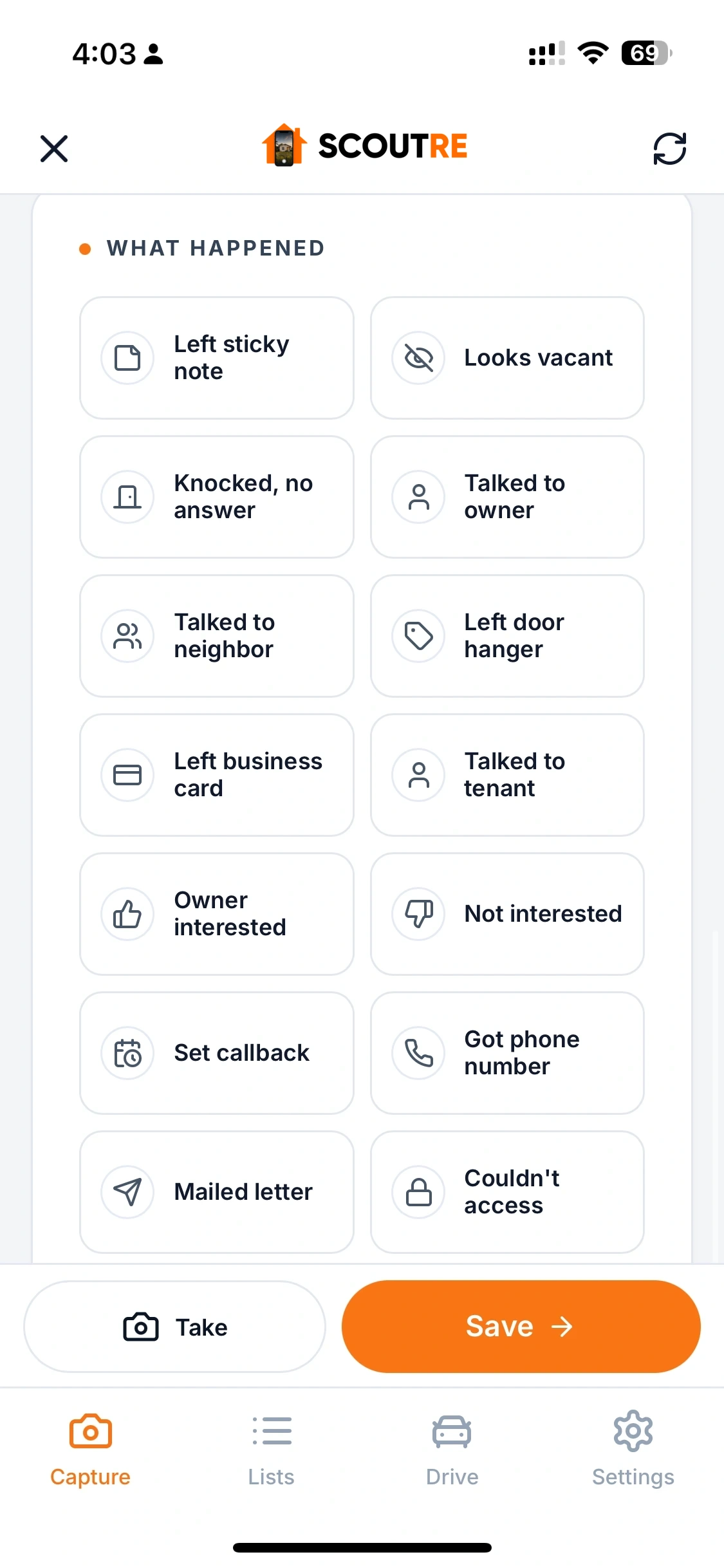
Rate distress 1–5, add a voice note, tag what you see and what you did, and snap photos — all saved to the lead forever.

Distress rating 1 to 5

Clean, Tired, Neglected, Distressed, Severe. Each level comes with plain language guidance, like "Visible deferred maintenance. Owner checked out. Wholesale sweet spot." Filter your pipeline by condition later.

Voice notes per property

Talk while you walk. Each voice note becomes its own note on the lead: "Spoke with the owner, wife recently passed, thinking of moving near the kids." That detail closes deals months later.

Photos on the lead

Take photos inside the capture flow. They live on the property record forever, not somewhere in your camera roll between lunch and the dog.

Typed notes

Anything else worth remembering, right on the record.
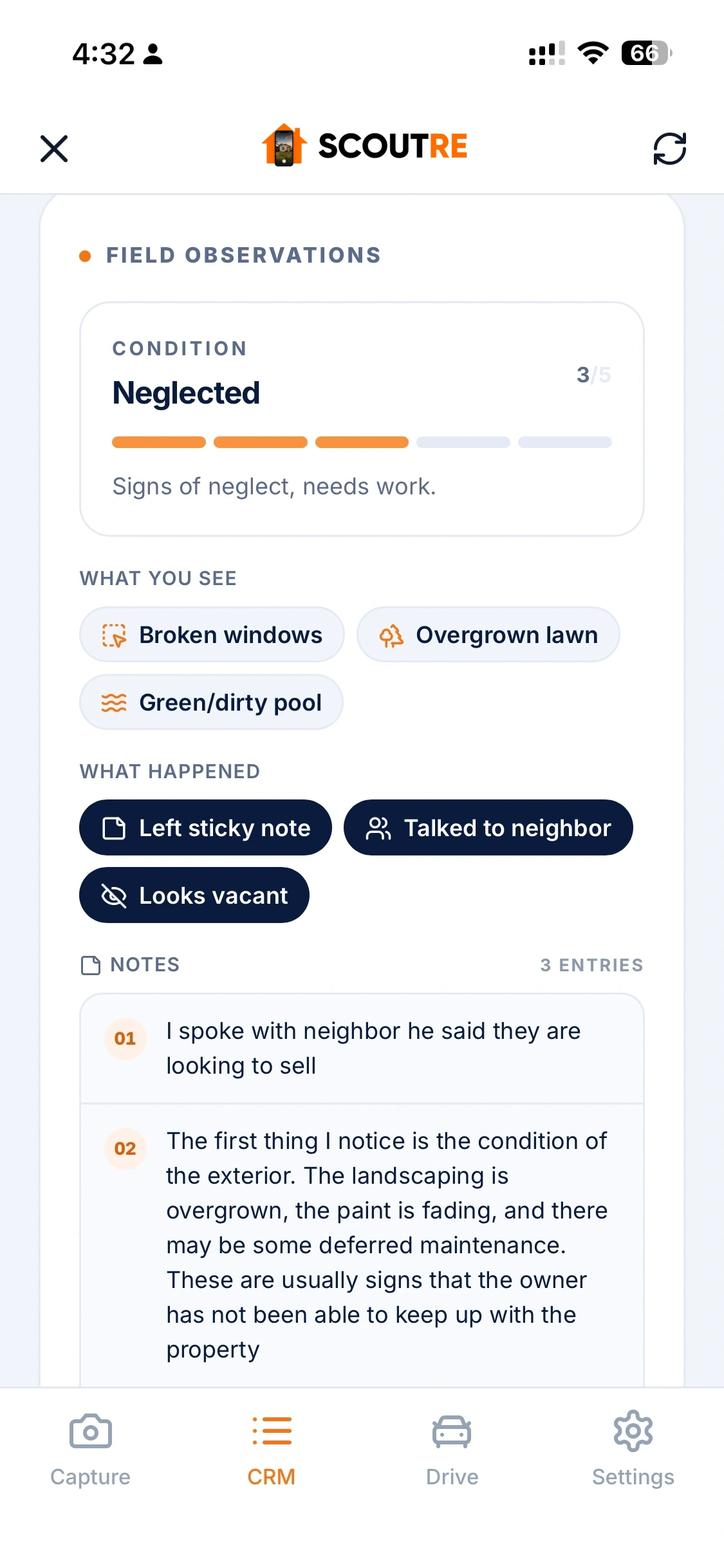
Real field record
Voice note, condition, visit outcome and photo stay together.Observe → save
08 · Analyze the deal in minutes

From ARV to a defensible offer — no spreadsheet, no guesswork.

Capturing the lead is half the job. A guided deal analysis walks you from address to offer number — the same underwriting discipline a full acquisitions team runs, on your phone:

  • ARV from real comparable sales, with an automatic confidence score so you know how solid the number is before you lean on it
  • Adjust or override the ARV when you know the street better than the data — include or exclude each comp with one tap, or add your own
  • Repair estimate: a fast per-square-foot mode, or a detailed line-item breakdown across 16 categories — roof, HVAC, kitchen, baths and more
  • Seller motivation scoring that reads the distress signals and your own field notes
  • A clear deal verdict — strong, possible, thin, or pass — so you know what you're looking at instantly
  • Offer engine: your maximum offer and a suggested opening offer, with an explicit Approve step before any offer goes out

Every number explains itself — which comps drove the ARV, how confident that ARV is, which ceiling capped the offer. No black boxes between you and the contract.

Comparable sales
Sold-property requirements and selected comps.Comps → ARV
Guided underwriting
ARV, repairs, exits, MAO and offer email.Analyze → act
09 · Exit strategies

Every exit strategy, one simple screen.

Whether you assign it, flip it, hold it, or get creative, SCOUTRE shows the maximum you can offer — with just the few numbers that actually drive the decision. The full spreadsheet math is there when you want it, tucked neatly under Advanced.

  • Wholesale Assignment, Fix & Flip, Rental, Creative Finance (seller financing / subject-to / hybrid), Double Close, and Referral / JV
  • Recommended buyer price, your fee, your buffer — then your maximum seller offer and a suggested opening offer
  • Advanced assumptions for power users, hidden until you need them
10 · Generate the offer

Turn the analysis into a ready-to-send offer email.

  • Pick which owner to address and which email on file to send to
  • Choose a proven style, or save your own reusable templates
  • Auto-signed with your name, company, phone and email
  • Open straight in your mail app, or copy it and send however you like

The offer email writes itself from the deal you just built — numbers, address and terms already in place — signed as you, in seconds.

11 · Shareable deal reports

The whole deal as a clean, professional PDF.

Produce a polished PDF of the entire deal — property, numbers, offer and verdict — to send to a cash buyer, a partner, or drop in your files. One tap, and it's ready to share.

  • One-tap export and share, straight from the lead
  • Owner, property data, ARV, repairs, exit strategy and offer — all in one document
  • Buyer-ready formatting you can send without touching a spreadsheet
12 · Pipeline

A pipeline you actually maintain, because it maintains itself.

  • One clear status pipeline, one tap to advance: New → Queued → Called → Texted → Contacted → Analyzing → Offer Sent → Negotiating → Under Contract → Closed → Dead
  • Filter on every data point on the property: equity %, estimated value, square footage, beds and baths, year built, mortgage vs free & clear, MLS status and days on market, tax delinquent, pre foreclosure, auction, liens, absentee and out of state owners, inherited, long time owners, pool, HOA and more
  • Filter Direct Mail activity by mailed pieces and cash-offer requests
  • Plus everything you observed: distress score, the 23 what-you-see tags, the 15 what-happened tags, photos, notes, traced, follow up window
  • Sort by newest, distress, equity, value, size or next follow up
  • Active filters stay visible as chips under the search bar — remove any with one tap
  • Search saved leads by owner or address, or open Nationwide Property Search to research an address outside your CRM.
  • Found property already saved? SCOUTRE opens the existing lead instead of creating a duplicate.
  • Route button opens turn by turn navigation back to any property
  • Choose Google or Apple for navigation and calendar, feet or meters, and replay every tutorial from Settings
  • Everything persists forever: reopen the app next month and pick up exactly where you left off
Live lead pipeline
Filter territory, reopen leads and keep next action visible.Filter → follow up
13 · Follow ups & calendar

Follow ups that leave the app and land in your life.

Most deals are made on the follow up. SCOUTRE makes scheduling one a five second job:

  • Quick picks: Tomorrow, In 3 days, Next week
  • Full calendar picker with morning, midday, afternoon, evening or custom times
  • Attach a note: "Owner said call back after the 15th"
  • One tap add to Google Calendar or download .ics for Apple Calendar
  • Filter your pipeline by Overdue, Today, Next 7 days or Scheduled

Frequently asked questions

Which distress signals point to a motivated seller?

One property at a time, and never as a market-wide pull. You add a house from the kerb with Property in Front, or by address with Nationwide Property Search, and SCOUTRE returns the 16 distress signals on that record: preforeclosure, probate, tax liens and vacancy among the flags that mark an owner with a reason to sell. Availability varies by property, county and source.

Every feature. One price. No meters.

$79 per month. One user, unlimited leads and owner contact lookups, property intelligence, deal analysis, offers, CRM, follow-ups and Direct Mail. See the full breakdown, read how the $79 plan compares with PropStream pricing, or start scouting.

Start free See pricing
US-based customer service Questions? Email our support team. Available 7 days a week · 9 AM–5 PM Eastern Time